AIS for AIS-catcher
One line feeds what your antenna hears to Open Waters AIS. Once your token earns contributor access, read network traffic back into a separate AIS-catcher viewer. Your receptions are public open data under CC0; Open Waters gets no exclusive rights.
This guide is for people already running AIS-catcher. Starting with your first USB receiver? Follow the shore setup guide for hardware, installation, and a token-filled configuration download. Using docker-shipfeeder? Its built-in Open Waters integration handles the token and output for you.
Get your token first
Open the token page, accept the contributor agreement, and generate your token. Return to this tab and the authenticated commands below will contain it. For MQTT or HTTP, leave network-address binding unchecked. Keep commands containing your token private.
Ships past your horizon
Your antenna reaches as far as it reaches. Read the network back and the same viewer shows every vessel every other station and source hears, worldwide.
The aggregate, not a snapshot
Deduplicated raw NMEA on one WebSocket, live, bbox-filterable. Use a bounding box to keep your viewer focused on the water you care about.
A station with your name on it
Vessels heard, coverage extent, and how many messages yours delivered first — the number that says what your antenna adds rather than how busy its harbour is.
Nothing exclusive
CC0 on your receptions, ODbL on the aggregate, and no request that you stop feeding anywhere else. Adding this is one more output line.
Send what you hear
Use MQTT unless your setup needs another transport. Add the options starting at -Q, -H, or -u to the command you already run, keeping its input settings and other outputs. Save and restart your existing receiver process; do not start a second process on the same USB device.
MQTT over WebSocket
Credited to your tokenAIS-catcher -Q wssmqtt://x:<token>@ais.openwaters.io:443/v1/stream MSGFORMAT NMEAThe one to start with. AIS-catcher publishes each message the moment it is decoded, and it dials out over 443, so it works behind any home router with nothing forwarded.
HTTP POST
Credited to your tokenAIS-catcher -H https://ais.openwaters.io/v1/receive USERPWD x:<token> GZIP on INTERVAL 5The same station identity, batched on an interval instead of sent per message. Use it if you already feed something else over HTTP and want one more of the same shape.
Plain UDP
Needs its address bound to earn the tierAIS-catcher -u udp.ais.openwaters.io 10110Nothing to create and nothing to paste. Fine for trying it in a minute, and the path to use if your build predates the other two.
Two details that trip people up. The port in the MQTT address is required — AIS-catcher does not assume 443 for wssmqtt://. And MSGFORMAT NMEA_TAG works too, carrying the time each message was received in a TAG block, which is worth it if your station ever buffers.
For the UDP path, your station shows up as a hash of your address, never the address itself, or as your vessel's MMSI once it has sent its own position report. UDP is unauthenticated and therefore the lowest-trust path: those messages appear on the map and in the streams immediately, but they reach the raw feed and other aggregators only while a trusted source has heard the same vessel recently.
Create a token in your browser — no sign-up, no email, and it does not expire.
Already have a VHF with AIS receive?
Then you probably do not want AIS-catcher. It is a decoder: it turns radio into NMEA sentences. A fixed-mount VHF with AIS receive has already done that, and already has the filtering and a real marine antenna, so it hands your computer finished sentences with nothing left to decode.
If the machine it is wired to runs Signal K, use the Signal K plugin instead. It shares every sentence the server receives, needs no extra wiring, and sends network traffic back out to your chartplotter. Running AIS-catcher alongside it would also mean two programs wanting the same serial device, which one of them will lose.
With no Signal K, AIS-catcher can forward from the serial port instead of decoding — AIS-catcher -e 38400 /dev/ttyUSB0 -u udp.ais.openwaters.io 10110. 38400 is the standard rate for AIS on NMEA 0183. Wire the adapter receive-only.
Read the network back
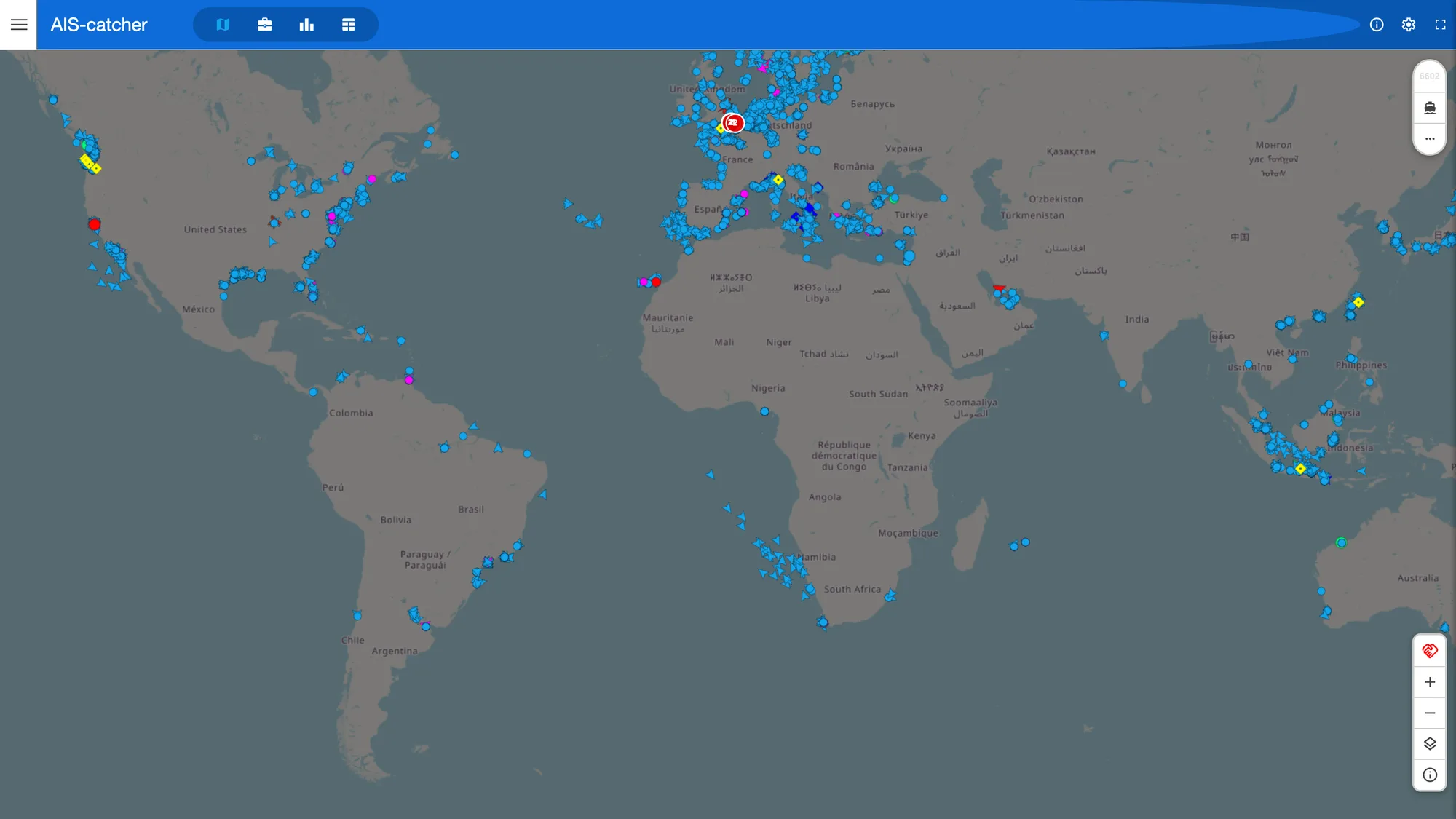
This is the part most people do not know exists. Contributors can read the deduplicated feed — every station, every source, one stream — back into their own AIS-catcher instance, so the viewer stops being a picture of what your antenna hears and becomes a picture of what the network hears.
AIS-catcher's own network inputs are plain TCP and UDP, not WebSockets, so bridge the feed into its built-in UDP server and point its web viewer at the result. Install websocat first. Leave your hardware receiver running, then run these commands in two separate terminals on the same computer:
Terminal 1: start the network viewer.
AIS-catcher -x 127.0.0.1 10110 -N 8100 -X offTerminal 2: send the network feed to that viewer.
websocat -t 'wss://ais.openwaters.io/v1/nmea?key=<token>&bbox=48,-126,51,-122' udp:127.0.0.1:10110/v1/nmea needs a token at the contributor tier, which your station earns by feeding — so this is the thing feeding gets you, not a separate product. Each frame is one message, sentences joined by CRLF, with a TAG block naming the station that heard it, the time, and the licence its source publishes under.
The bbox is optional and repeatable, and worth setting even though the load is not the reason. A Pi 5 took the unfiltered world at about 0.2% CPU, so that is not what bites. AIS-catcher's vessel table holds 4,096 ships, and a worldwide feed fills it in minutes and then churns — which means the six-minutely static messages carrying vessel names mostly arrive after a ship has already been evicted, and you get a map of unnamed contacts. Bound it to the water you care about and the names stay.
Keep the network out of your receiver outputs. The viewer command above is a separate instance, with no forwarding outputs and community sharing disabled by -X off. Keep your hardware receiver’s MQTT, HTTP, and UDP outputs on its original process. Adding those outputs to the network viewer would send the aggregate back as your own reception. If you combine inputs in one process, configure output groups so only locally received traffic reaches each sharing output.
Open localhost:8100 to see the network viewer. Keep the bridge and viewer processes running. The example bounding box covers southern British Columbia; replace it with your area’s south, west, north, and east limits in decimal degrees.
Already running Signal K? Then skip the bridge. The Signal K plugin already pulls network traffic in and re-emits it as NMEA 0183, so AIS-catcher can read the server's output directly and show your receiver's own targets and the network's together, with no token and nothing to install:
AIS-catcher -t txt://localhost:10110 -N 8100 -X offYour data
Individual volunteer receptions are dedicated to the public domain under CC0. The combined volunteer database is published under ODbL; partner feeds keep their own terms. You can keep using your receptions and sending them to other networks.
The contributor agreement sets out those terms. Read how the open network works for federation, reuse rights, and the forthcoming bulk archive downloads.
Your station
Your station gets a page as soon as it is heard, showing the vessels it has heard, how far it reaches, and how many messages it was the first to deliver. That last number is the one worth watching. A rooftop in a busy harbour can log millions of messages that three other stations also logged; a station on an empty headland can log a fraction of that and be the only reason those vessels appear at all.
Ranking by volume would tell you to point antennas where the ships already are. Heard-first tells you to point them at the gaps, which is the actual problem. Naming your station is optional and free.
Keep feeding everyone
Open Waters AIS never asks a station to stop feeding anywhere else, and never will. AIS-catcher fans out to as many destinations as you configure, and docker-shipfeeder supports the Open Waters feed directly. Follow the shipfeeder setup instructions to enable it without adding a second copy of the same output.
FAQ
Do I need an account or an API key?
No account. The UDP path needs nothing at all. The authenticated paths need a token, which you create yourself on the token page in a browser — there is no sign-up, no email, and it never expires.
What do I get for feeding?
The contributor tier, which turns on by itself once your station has delivered 1,000 messages the network had not already heard in 24 hours. That is five concurrent streams, 200 messages a second, any area, and the raw NMEA feed this page is built around. There is no application and nobody to email. Stop feeding and it lapses after a day; start again and it comes back.
Which output should I use?
MQTT, unless you have a reason not to. It is realtime where the HTTP output batches on an interval, it carries your station identity, and it connects outward over port 443 so a home network needs no port forwarding. UDP is the quickest to try and the only one that needs no token, but it earns no tier until you bind its source address.
Why does my UDP station not get the contributor tier?
UDP carries no authentication, so the network cannot tell whose station it is. Create a personal token from the same address with address binding turned on, and that station starts counting toward it. Switching to the MQTT or HTTP output instead does the same thing without the binding step.
Can I keep feeding AISHub, MarineTraffic, or aiscatcher.org?
Yes, and please do. AIS-catcher fans out to as many destinations as you give it, and Open Waters AIS never asks a station to stop feeding anywhere else. Adding this is one more output, not a switch.
I have a VHF radio with AIS receive, not an SDR. Can I still contribute?
Yes, and AIS-catcher is probably not the tool. Your radio has already decoded the signal and hands over finished NMEA sentences, so there is nothing left to decode. If the machine it is wired to runs Signal K, the Signal K plugin shares what the radio hears and needs no extra wiring.
Is it free?
Yes. Reading is free, feeding is free, and feeding earns higher limits including commercial use within them. What you share is published under the contributor agreement: volunteer receptions are CC0 and the aggregate is ODbL.
Does this replace an AIS receiver or a transponder?
No. Network traffic arrives seconds to a minute behind, and nothing on the internet makes you visible to a ship that cannot see you. Open Waters AIS is a supplement to onboard AIS, never a substitute, and it is not for safety of navigation.
One more output line
Then read back the network you just joined. Coverage questions, antenna advice, and setup problems go to the discussions.
Create a tokenAPI docsAIS-catcherAIS-catcher docsDiscussions